GraphQL is a query language for APIs that was developed by Facebook in 2012 and open-sourced in 2015. It provides a powerful, flexible alternative to REST by allowing clients to request exactly the data they need in a single request, thereby reducing over-fetching and under-fetching issues. While GraphQL offers great advantages such as efficient data retrieval and strong typing, it also comes with challenges like increased complexity in caching and potential performance pitfalls if queries are not well optimized.

1. Introduction to GraphQL
What is GraphQL?
GraphQL is a declarative data fetching language that lets clients specify exactly what data they need. Unlike REST, where the structure of the response is defined by the server, GraphQL responses mirror the shape of the query. This flexibility allows for:
- Efficient Data Retrieval: Clients can request only the necessary fields.
- Strong Typing: A predefined schema ensures type safety.
- Single Endpoint: Unlike multiple REST endpoints, GraphQL uses one endpoint for all data queries.
Pros and Cons
Pros:
- Flexible and Efficient: Clients fetch exactly what they need.
- Single Request: Reduces the number of network calls.
- Strongly Typed Schema: Provides clear documentation and validation.
Cons:
- Complexity: Learning curve can be steep, especially for caching and performance tuning.
- Overhead: May require additional tooling and infrastructure for schema management.
- Security: Requires careful query complexity analysis to prevent abuse.
2. Basic GraphQL Syntax in Spring Boot
In Spring Boot applications, GraphQL is typically integrated using the spring-boot-starter-graphql dependency. The core components include:
- Schema File (schema.graphqls): Defines the types, queries, and mutations.
- Query Resolvers: Methods annotated with @QueryMapping that resolve queries.
- Mutation Resolvers: Methods annotated with @MutationMapping that handle data modifications.
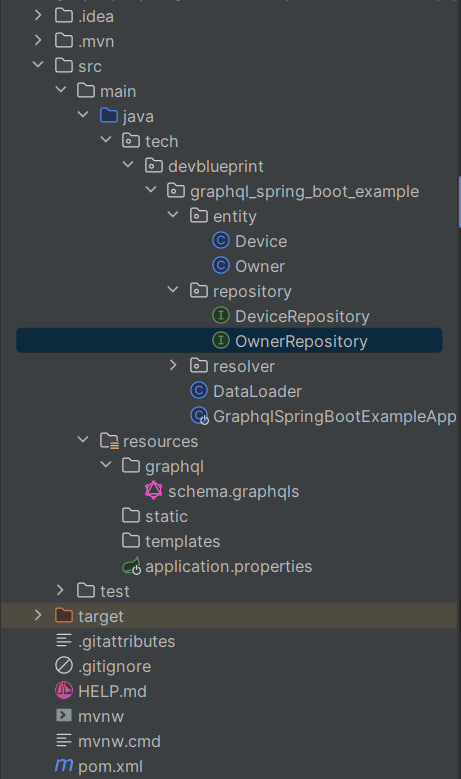
For example, a simple schema might define a Device and Owner type, along with queries to fetch them and mutations to create new ones. In our project, this is reflected in the code files such as:
- QueryResolver.class – Contains query methods like devices(), deviceById(Long id), owners(), and ownerById(Long id).
- MutationResolver.class – Provides mutation methods to create an owner and a device.
Final project structure:
3. Project Setup
Both the producer and consumer parts of our GraphQL project are created using Spring Initializr. For this example, we include the following dependencies:
- Spring Boot Starter GraphQL for GraphQL support.
- Spring Boot Starter Data JPA for persistence.
- H2 Database for an in-memory database.
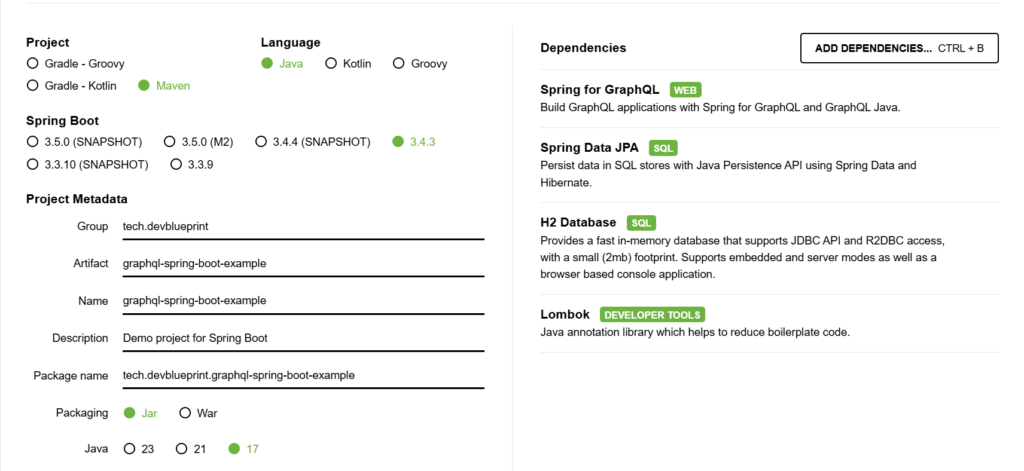
The final pom.xml for the project is similar to the following, with all necessary dependencies added:
<?xml version="1.0" encoding="UTF-8"?>
<project xmlns="http://maven.apache.org/POM/4.0.0" xmlns:xsi="http://www.w3.org/2001/XMLSchema-instance"
    xsi:schemaLocation="http://maven.apache.org/POM/4.0.0 https://maven.apache.org/xsd/maven-4.0.0.xsd">
    <modelVersion>4.0.0</modelVersion>
    <parent>
        <groupId>org.springframework.boot</groupId>
        <artifactId>spring-boot-starter-parent</artifactId>
        <version>3.4.3</version>
        <relativePath/> <!-- lookup parent from repository -->
    </parent>
    <groupId>tech.devblueprint</groupId>
    <artifactId>graphql-spring-boot-example</artifactId>
    <version>0.0.1-SNAPSHOT</version>
    <name>graphql-spring-boot-example</name>
    <description>Demo project for Spring Boot</description>
    <url/>
    <properties>
        <java.version>17</java.version>
    </properties>
    <dependencies>
        <dependency>
            <groupId>org.springframework.boot</groupId>
            <artifactId>spring-boot-starter-data-jpa</artifactId>
        </dependency>
        <dependency>
            <groupId>org.springframework.boot</groupId>
            <artifactId>spring-boot-starter-graphql</artifactId>
        </dependency>
        <dependency>
            <groupId>com.h2database</groupId>
            <artifactId>h2</artifactId>
            <scope>runtime</scope>
        </dependency>
        <dependency>
            <groupId>org.projectlombok</groupId>
            <artifactId>lombok</artifactId>
            <optional>true</optional>
        </dependency>
        <dependency>
            <groupId>org.springframework.boot</groupId>
            <artifactId>spring-boot-starter-test</artifactId>
            <scope>test</scope>
        </dependency>
        <dependency>
            <groupId>org.springframework.graphql</groupId>
            <artifactId>spring-graphql-test</artifactId>
            <scope>test</scope>
        </dependency>
    </dependencies>

    <build>
        <plugins>
            <plugin>
                <groupId>org.apache.maven.plugins</groupId>
                <artifactId>maven-compiler-plugin</artifactId>
                <configuration>
                    <annotationProcessorPaths>
                        <path>
                            <groupId>org.projectlombok</groupId>
                            <artifactId>lombok</artifactId>
                        </path>
                    </annotationProcessorPaths>
                </configuration>
            </plugin>
            <plugin>
                <groupId>org.springframework.boot</groupId>
                <artifactId>spring-boot-maven-plugin</artifactId>
                <configuration>
                    <excludes>
                        <exclude>
                            <groupId>org.projectlombok</groupId>
                            <artifactId>lombok</artifactId>
                        </exclude>
                    </excludes>
                </configuration>
            </plugin>
        </plugins>
    </build>

</project>
Additionally, the application.properties file is configured to use the H2 in-memory database and to set the GraphQL endpoint (default is /graphql).
spring.application.name=graphql-spring-boot-example
# H2 Database configuration
spring.datasource.url=jdbc:h2:mem:deviceownerdb
spring.datasource.driverClassName=org.h2.Driver
spring.datasource.username=sa
spring.datasource.password=

# JPA / Hibernate configuration
spring.jpa.database-platform=org.hibernate.dialect.H2Dialect
spring.jpa.hibernate.ddl-auto=update

# Enable H2 console
spring.h2.console.enabled=true
spring.h2.console.path=/h2-console

# GraphQL endpoint (default is /graphql)
spring.graphql.path=/graphql
4. Project Implementation
Entity and Repository Layers
Our domain model consists of two entities:
Device – Represents a device and includes fields like id and name, and a reference to its owner.
package tech.devblueprint.graphql_spring_boot_example.entity;

import jakarta.persistence.*;
import lombok.AllArgsConstructor;
import lombok.Data;
import lombok.NoArgsConstructor;

@Entity
@Data
@NoArgsConstructor
@AllArgsConstructor
public class Device {

  @Id
  @GeneratedValue(strategy = GenerationType.IDENTITY)
  private Long id;

  private String name;

  // Many devices can belong to one owner
  @ManyToOne
  @JoinColumn(name = "owner_id")
  private Owner owner;
}
Owner – Represents the owner of one or more devices and includes fields like id and name.
package tech.devblueprint.graphql_spring_boot_example.entity;

import jakarta.persistence.*;
import lombok.AllArgsConstructor;
import lombok.Data;
import lombok.NoArgsConstructor;
import java.util.List;

@Entity
@Data
@NoArgsConstructor
@AllArgsConstructor
public class Owner {

  @Id
  @GeneratedValue(strategy = GenerationType.IDENTITY)
  private Long id;

  private String name;

  // One owner can have many devices
  @OneToMany(mappedBy = "owner", cascade = CascadeType.ALL)
  private List<Device> devices;
}
Repositories are straightforward Spring Data JPA interfaces:
package tech.devblueprint.graphql_spring_boot_example.repository;

import org.springframework.data.jpa.repository.JpaRepository;
import org.springframework.stereotype.Repository;
import tech.devblueprint.graphql_spring_boot_example.entity.Device;

@Repository
public interface DeviceRepository extends JpaRepository<Device, Long> {
}
package tech.devblueprint.graphql_spring_boot_example.repository;

import org.springframework.data.jpa.repository.JpaRepository;
import org.springframework.stereotype.Repository;
import tech.devblueprint.graphql_spring_boot_example.entity.Owner;

@Repository
public interface OwnerRepository extends JpaRepository<Owner, Long> {
}
GraphQL Schema (schema.graphqls)
The schema file defines the structure of your API and serves as a contract between the client and server. Key elements include:
Full schema:
# GraphQL schema definition for Device and Owner

type Device {
  id: ID!
  name: String!
  owner: Owner!
}

type Owner {
  id: ID!
  name: String!
  devices: [Device!]!
}

type Query {
  # Returns all devices
  devices: [Device!]!
  # Returns a device by its id
  deviceById(id: ID!): Device
  # Returns all owners
  owners: [Owner!]!
  # Returns an owner by id
  ownerById(id: ID!): Owner
}

type Mutation {
  # Creates a new owner
  createOwner(name: String!): Owner
  # Creates a new device for an existing owner
  createDevice(name: String!, ownerId: ID!): Device
}
Explanation:
Type Definitions:
Here, you define the data models (e.g., Device and Owner). Each type includes fields with their respective data types. For example:
type Device {
    id: ID!
    name: String!
    owner: Owner
}

type Owner {
    id: ID!
    name: String!
    devices: [Device]
}
In this snippet:
- The
!indicates that the field is non-nullable. - The
[Device]denotes a list ofDeviceobjects.
Query Type:
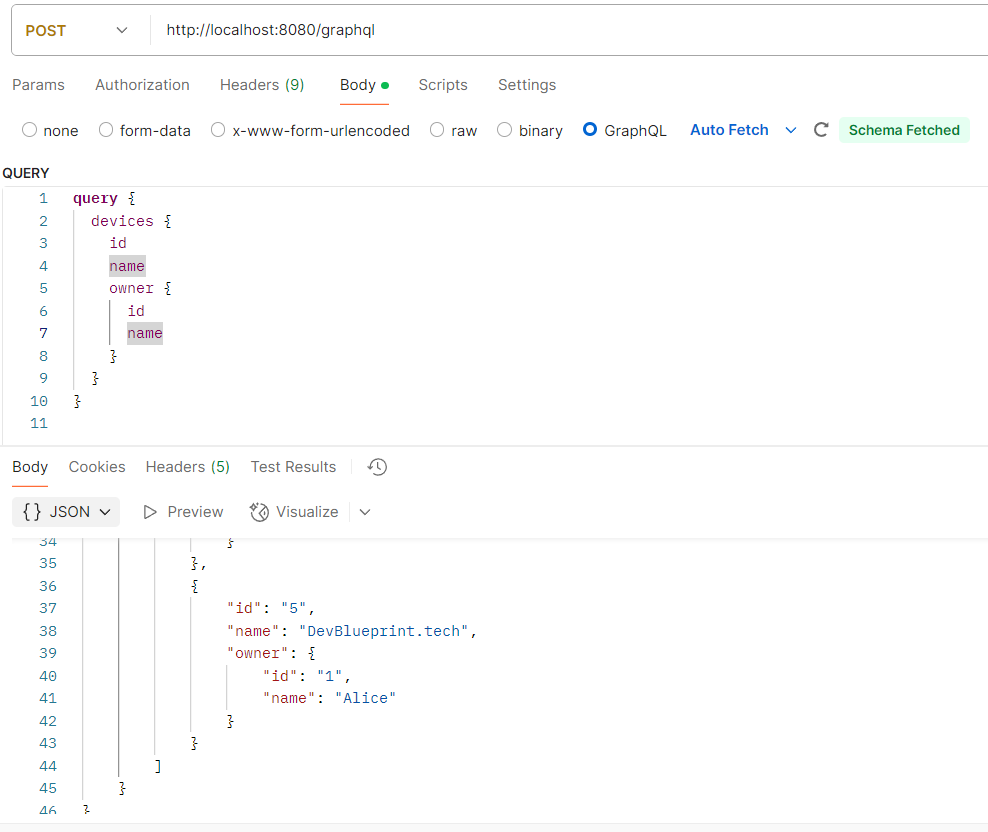
The Query type defines the entry points for read operations. For instance, you might have queries to fetch all devices or a single device by its ID:
type Query {
    devices: [Device]
    deviceById(id: ID!): Device
    owners: [Owner]
    ownerById(id: ID!): Owner
}
Mutation Type:
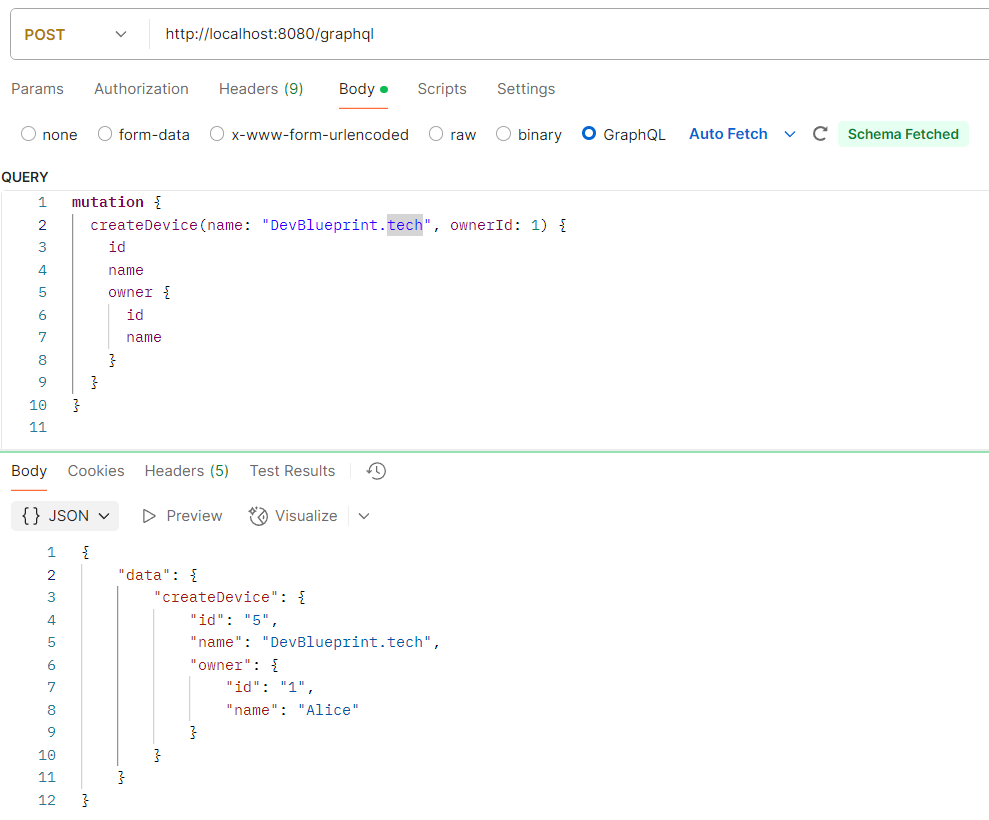
The Mutation type specifies write operations. In our project, we have mutations for creating owners and devices:
type Mutation {
    createOwner(name: String!): Owner
    createDevice(name: String!, ownerId: ID!): Device
}
GraphQL Resolvers
The resolver classes are responsible for mapping the operations defined in the GraphQL schema to actual Java methods. In our project, we have two key resolver classes:
MutationResolver
Purpose:
Handles mutations defined in the schema, allowing clients to create or modify data.
package tech.devblueprint.graphql_spring_boot_example.resolver;

import tech.devblueprint.graphql_spring_boot_example.entity.Device;
import tech.devblueprint.graphql_spring_boot_example.entity.Owner;
import tech.devblueprint.graphql_spring_boot_example.repository.DeviceRepository;
import tech.devblueprint.graphql_spring_boot_example.repository.OwnerRepository;
import org.springframework.graphql.data.method.annotation.Argument;
import org.springframework.graphql.data.method.annotation.MutationMapping;
import org.springframework.stereotype.Controller;

@Controller
public class MutationResolver {

    private final DeviceRepository deviceRepository;
    private final OwnerRepository ownerRepository;

    public MutationResolver(DeviceRepository deviceRepository, OwnerRepository ownerRepository) {
        this.deviceRepository = deviceRepository;
        this.ownerRepository = ownerRepository;
    }

    @MutationMapping
    public Owner createOwner(@Argument String name) {
        Owner owner = new Owner();
        owner.setName(name);
        return ownerRepository.save(owner);
    }

    @MutationMapping
    public Device createDevice(@Argument String name, @Argument Long ownerId) {
        Owner owner = ownerRepository.findById(ownerId).orElse(null);
        if (owner == null) {
            throw new RuntimeException("Owner not found with id " + ownerId);
        }
        Device device = new Device();
        device.setName(name);
        device.setOwner(owner);
        return deviceRepository.save(device);
    }
}
Key Methods:
-
createOwner(@Argument String name):
This method corresponds to the createOwner mutation. It receives the owner’s name as an argument, creates a new Owner entity, and saves it to the database. -
createDevice(@Argument String name, @Argument Long ownerId):
This method maps to the createDevice mutation. It takes the device’s name and the owner ID, fetches the corresponding owner, creates a new Device entity linked to that owner, and then persists it.
GraphQL Syntax Involved:
- @MutationMapping: Annotation that indicates the method should handle a GraphQL mutation.
- @Argument: Binds a GraphQL argument to the method parameter.
These annotations allow Spring to automatically route mutation requests from GraphQL to these methods.
QueryResolver
Purpose:
Handles queries, which are used to fetch data from the application.
package tech.devblueprint.graphql_spring_boot_example.resolver;

import org.springframework.graphql.data.method.annotation.Argument;
import org.springframework.graphql.data.method.annotation.QueryMapping;
import org.springframework.stereotype.Controller;
import tech.devblueprint.graphql_spring_boot_example.entity.Device;
import tech.devblueprint.graphql_spring_boot_example.entity.Owner;
import tech.devblueprint.graphql_spring_boot_example.repository.DeviceRepository;
import tech.devblueprint.graphql_spring_boot_example.repository.OwnerRepository;

import java.util.List;

@Controller
public class QueryResolver {

    private final DeviceRepository deviceRepository;
    private final OwnerRepository ownerRepository;

    public QueryResolver(DeviceRepository deviceRepository, OwnerRepository ownerRepository) {
        this.deviceRepository = deviceRepository;
        this.ownerRepository = ownerRepository;
    }

    @QueryMapping
    public List<Device> devices() {
        return deviceRepository.findAll();
    }

    @QueryMapping
    public Device deviceById(@Argument Long id) {
        return deviceRepository.findById(id).orElse(null);
    }

    @QueryMapping
    public List<Owner> owners() {
        return ownerRepository.findAll();
    }

    @QueryMapping
    public Owner ownerById(@Argument Long id) {
        return ownerRepository.findById(id).orElse(null);
    }
}
Key Methods:
-
devices(): Resolves the devices query by fetching and returning a list of all Device entities.
-
deviceById(@Argument Long id): Handles the deviceById query, which retrieves a single device based on its ID.
-
owners() and ownerById(@Argument Long id): These methods are similar to the device queries but work with Owner entities instead.
GraphQL Syntax Involved:
- @QueryMapping: Annotation that designates a method as the resolver for a GraphQL query.
- @Argument: Used to pass query parameters to the resolver method.
5. Testing GraphQL Queries
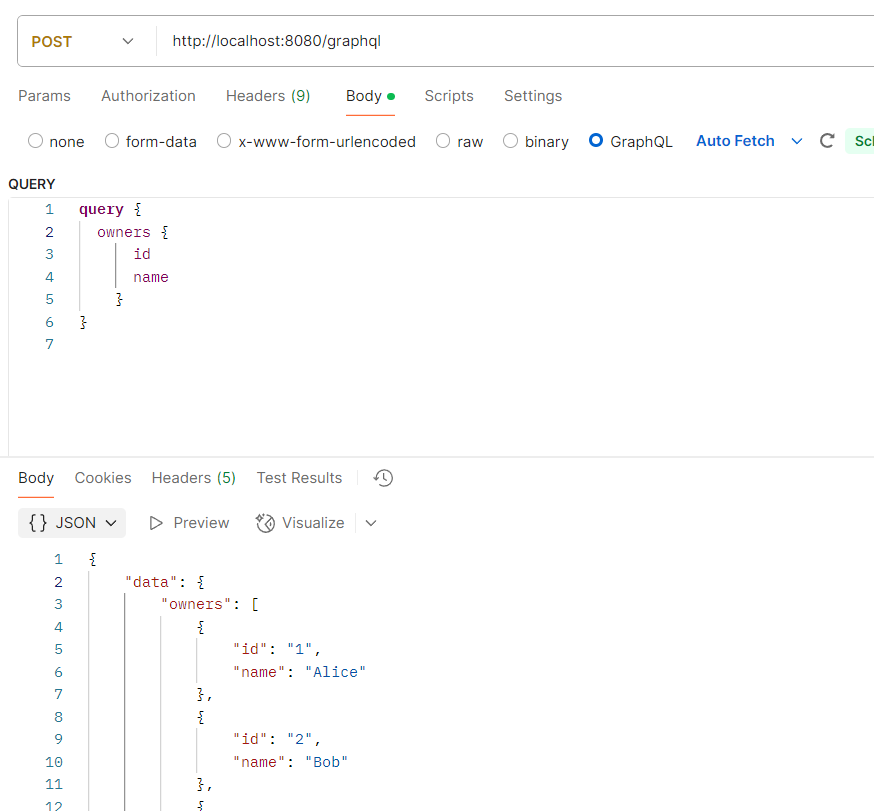
After setting up the project, we perform several text-based GraphQL queries to test the API:
Conclusion
In this article, we introduced GraphQL, discussed its origins, advantages, and drawbacks, and outlined its core syntax as used in Spring Boot applications. We then detailed how to create a GraphQL project using Spring Initializr, covering entity creation, repository setup, and the implementation of query and mutation resolvers. Finally, we demonstrated how to perform textual queries for creating and retrieving entities.