Introduction
The @DataJpaTest annotation in Spring Boot is specifically designed for isolated testing of JPA repositories. Instead of bootstrapping the entire Spring Boot application, it loads only JPA-related components such as:
✅ @Entity classes
✅ Spring Data JPA repositories
✅ Database configuration
What Happens When Using @DataJpaTest?
By default, @DataJpaTest:
- Automatically configures an in-memory database (H2, HSQLDB, Derby) if available.
- Rolls back transactions at the end of each test, ensuring data isolation.
- Excludes unnecessary beans (
@Component,@Service,@Controller), making tests lightweight and fast. - Executes schema and data SQL scripts when specified.
This approach, known as “slicing”, ensures faster execution and more focused testing.
Project Setup
To get started, create a Spring Boot project with the following dependencies:
- Spring Data JPA – For database interaction.
- H2 Database – An in-memory database for testing.
-
Postgresql – Will not be used for testing, we just imagine that we have this database in real env.
- Spring Boot Starter Test – Includes JUnit, AssertJ, and Mockito.
Spring Boot Testing Libraries
Spring Boot provides a comprehensive testing framework through the spring-boot-starter-test dependency. It includes:
- JUnit – The core testing framework.
- Spring Test & Spring Boot Test – Utilities for integration and context-based testing.
- AssertJ – A fluent assertion library.
- Hamcrest – Advanced matcher library.
- Mockito – A powerful mocking framework.
- JSONassert – For JSON structure comparisons.
- JsonPath – For querying and asserting JSON responses.
Implementation
File: pom.xml
<?xml version="1.0" encoding="UTF-8"?>
<project xmlns="http://maven.apache.org/POM/4.0.0" xmlns:xsi="http://www.w3.org/2001/XMLSchema-instance"
    xsi:schemaLocation="http://maven.apache.org/POM/4.0.0 https://maven.apache.org/xsd/maven-4.0.0.xsd">
    <modelVersion>4.0.0</modelVersion>
    <parent>
        <groupId>org.springframework.boot</groupId>
        <artifactId>spring-boot-starter-parent</artifactId>
        <version>3.4.3</version>
        <relativePath/> <!-- lookup parent from repository -->
    </parent>
    <groupId>tech.devblueprint</groupId>
    <artifactId>datajpatest-spring-boot-testing-example</artifactId>
    <version>0.0.1-SNAPSHOT</version>
    <name>datajpatest-spring-boot-testing-example</name>
    <description>Demo project for Spring Boot</description>
    <url/>
    <properties>
        <java.version>17</java.version>
    </properties>
    <dependencies>
        <dependency>
            <groupId>org.springframework.boot</groupId>
            <artifactId>spring-boot-starter-data-jpa</artifactId>
        </dependency>

        <dependency>
            <groupId>com.h2database</groupId>
            <artifactId>h2</artifactId>
            <scope>runtime</scope>
        </dependency>
        <dependency>
            <groupId>org.postgresql</groupId>
            <artifactId>postgresql</artifactId>
            <scope>runtime</scope>
        </dependency>
        <dependency>
            <groupId>org.springframework.boot</groupId>
            <artifactId>spring-boot-starter-test</artifactId>
            <scope>test</scope>
        </dependency>
    </dependencies>

    <build>
        <plugins>
            <plugin>
                <groupId>org.springframework.boot</groupId>
                <artifactId>spring-boot-maven-plugin</artifactId>
            </plugin>
        </plugins>
    </build>

</project>
Key Dependencies Explained:
spring-boot-starter-data-jpa– Provides JPA support for interacting with relational databases.com.h2database:h2– Includes the H2 in-memory database for lightweight testing.org.postgresql:postgresql– Adds support for PostgreSQL (useful when switching from H2 to a real database).spring-boot-starter-test– Brings all essential testing libraries, such as JUnit, Mockito, and AssertJ.
H2 Database Configuration (Automatic)
One of the biggest advantages of @DataJpaTest is that Spring Boot automatically configures an in-memory H2 database, so no manual configuration is needed.
There’s no need to create a application-test.yaml file, as Spring Boot will:
- Use H2 as the default database (without additional setup).
- Automatically generate a fresh schema for each test.
- Roll back transactions after each test execution.
Entity Definition
File: src/main/java/.../entity/Device.java
package tech.devblueprint.datajpatest_spring_boot_testing_example.entity;

import jakarta.persistence.*;

@Entity
@Table(name = "devices")
public class Device {

    @Id
    @GeneratedValue(strategy = GenerationType.IDENTITY)
    private Long id;

    private String name;

    private String type;

    private Double price;

    public Device() {
    }

    public Device(String name, String type, Double price) {
        this.name = name;
        this.type = type;
        this.price = price;
    }

    // Getters и Setters

    public Long getId() {
        return id;
    }

    public void setId(Long id) {
         this.id = id;
    }

    public String getName() {
         return name;
    }

    public void setName(String name) {
         this.name = name;
    }

    public String getType() {
         return type;
    }

    public void setType(String type) {
         this.type = type;
    }

    public Double getPrice() {
         return price;
    }

    public void setPrice(Double price) {
         this.price = price;
    }
}
2. Repository Interface
File: src/main/java/.../repository/DeviceRepository.java
package tech.devblueprint.datajpatest_spring_boot_testing_example.repository;

import tech.devblueprint.datajpatest_spring_boot_testing_example.entity.Device;
import org.springframework.data.jpa.repository.JpaRepository;
import org.springframework.data.jpa.repository.Query;
import java.util.List;
import java.util.Optional;

public interface DeviceRepository extends JpaRepository<Device, Long> {

    // Derived Query
    List<Device> findByType(String type);

    // JPQL-Query
    @Query("FROM Device d WHERE d.price > ?1")
    List<Device> findDevicesByPriceGreaterThan(Double price);

    // Native SQL-Query
    @Query(value = "SELECT * FROM devices WHERE name = :name", nativeQuery = true)
    Optional<Device> findByName(String name);
}
Writing Tests with H2 Database
We will now create a test class that:
- Uses
@DataJpaTestfor repository testing. - Runs in-memory H2 database instead of a real database.
- Loads test data from SQL scripts.
File: src/test/java/.../repository/DeviceRepositoryTest.java
package tech.devblueprint.datajpatest_spring_boot_testing_example.repository;

import org.junit.jupiter.api.Test;
import org.springframework.beans.factory.annotation.Autowired;
import org.springframework.boot.test.autoconfigure.orm.jpa.DataJpaTest;
import org.springframework.test.context.jdbc.Sql;
import tech.devblueprint.datajpatest_spring_boot_testing_example.entity.Device;

import java.util.List;
import java.util.Optional;

import static org.assertj.core.api.Assertions.assertThat;

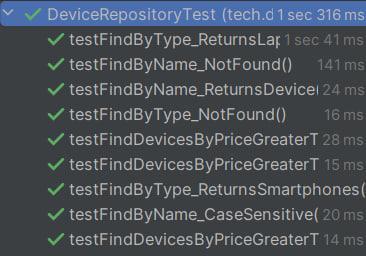
@DataJpaTest
@Sql({"/test-device-schema.sql"}) // Execute the schema creation script
public class DeviceRepositoryTest {

    @Autowired
    private DeviceRepository deviceRepository;

    // Tests for the findByName method
    // Successful search for device by name "iPhone 13"
    @Test
    @Sql({"/test-device-data.sql"})
    public void testFindByName_ReturnsDevice() {
        Optional<Device> deviceOpt = deviceRepository.findByName("iPhone 13");
        assertThat(deviceOpt).isPresent();
        Device device = deviceOpt.get();
        assertThat(device.getName()).isEqualTo("iPhone 13");
        assertThat(device.getType()).isEqualTo("Smartphone");
        assertThat(device.getPrice()).isEqualTo(999.99);
    }

    // Search for a non-existent device returns Optional.empty()
    @Test
    @Sql({"/test-device-data.sql"})
    public void testFindByName_NotFound() {
        Optional<Device> deviceOpt = deviceRepository.findByName("Non Existent Device");
        assertThat(deviceOpt).isNotPresent();
    }

    // Case sensitivity test (expecting that the search is case-sensitive)
    @Test
    @Sql({"/test-device-data.sql"})
    public void testFindByName_CaseSensitive() {
        Optional<Device> deviceOpt = deviceRepository.findByName("iphone 13");
        // Expecting no result due to case sensitivity
        assertThat(deviceOpt).isNotPresent();
    }

    // Tests for the findDevicesByPriceGreaterThan method
    // When the threshold is below the minimum price, all devices should be returned
    @Test
    @Sql({"/test-device-data.sql"})
    public void testFindDevicesByPriceGreaterThan_AllDevices() {
        List<Device> devices = deviceRepository.findDevicesByPriceGreaterThan(0.0);
        // There are 4 devices in the test data
        assertThat(devices).hasSize(4);
    }

    // Search for devices with price greater than 1000 (expecting two devices: Dell XPS 13 and MacBook Pro)
    @Test
    @Sql({"/test-device-data.sql"})
    public void testFindDevicesByPriceGreaterThan_TwoDevices() {
        List<Device> devices = deviceRepository.findDevicesByPriceGreaterThan(1000.0);
        assertThat(devices).hasSize(2);
        assertThat(devices)
                .extracting(Device::getName)
                .containsExactlyInAnyOrder("Dell XPS 13", "MacBook Pro");
    }

    // When the threshold exceeds the maximum price, the result list should be empty
    @Test
    @Sql({"/test-device-data.sql"})
    public void testFindDevicesByPriceGreaterThan_NoDevices() {
        List<Device> devices = deviceRepository.findDevicesByPriceGreaterThan(3000.0);
        assertThat(devices).isEmpty();
    }

    // Tests for the findByType method
    // Search for devices of type "Laptop" should return two devices
    @Test
    @Sql({"/test-device-data.sql"})
    public void testFindByType_ReturnsLaptops() {
        List<Device> devices = deviceRepository.findByType("Laptop");
        assertThat(devices).hasSize(2);
        assertThat(devices)
                .extracting(Device::getName)
                .containsExactlyInAnyOrder("Dell XPS 13", "MacBook Pro");
    }

    // Search for devices of type "Smartphone" should return two devices
    @Test
    @Sql({"/test-device-data.sql"})
    public void testFindByType_ReturnsSmartphones() {
        List<Device> devices = deviceRepository.findByType("Smartphone");
        assertThat(devices).hasSize(2);
        assertThat(devices)
                .extracting(Device::getName)
                .containsExactlyInAnyOrder("iPhone 13", "Galaxy S22");
    }

    // Search for devices of a non-existent type (e.g., "Tablet") should return an empty list
    @Test
    @Sql({"/test-device-data.sql"})
    public void testFindByType_NotFound() {
        List<Device> devices = deviceRepository.findByType("Tablet");
        assertThat(devices).isEmpty();
    }
}
Understanding Key Annotations
@DataJpaTest– Loads only JPA components for testing.@Sql("/test-device-schema.sql")– Runs schema creation script before tests.@Sql("/test-device-data.sql")– Loads test data before each test.
Understanding Key Annotations
@DataJpaTest– Loads only JPA-related components.@AutoConfigureTestDatabase(replace = AutoConfigureTestDatabase.Replace.NONE)– Prevents Spring Boot from replacing PostgreSQL with H2.@Sql("/test-device-schema.sql")– Runs a schema creation script before tests.@Sql("/test-device-data.sql")– Loads test data before each test.
Understanding Transactions in @DataJpaTest
By default, tests annotated with @DataJpaTest run in transactions and automatically roll back at the end of each test. This ensures that each test starts with a clean database state.
However, if you need to disable transaction management, use @Transactional(propagation = Propagation.NOT_SUPPORTED), as shown below:
@DataJpaTest
@Transactional(propagation = Propagation.NOT_SUPPORTED)
public class StudentRepositoryTests {

    @Autowired
    private StudentRepository studentRepository;

    @Test
    void findByName_ReturnsTheStudent() {
        // Test logic...
    }
}
This is useful when testing database operations that require commits, such as stored procedures or triggers.
Example SQL Scripts
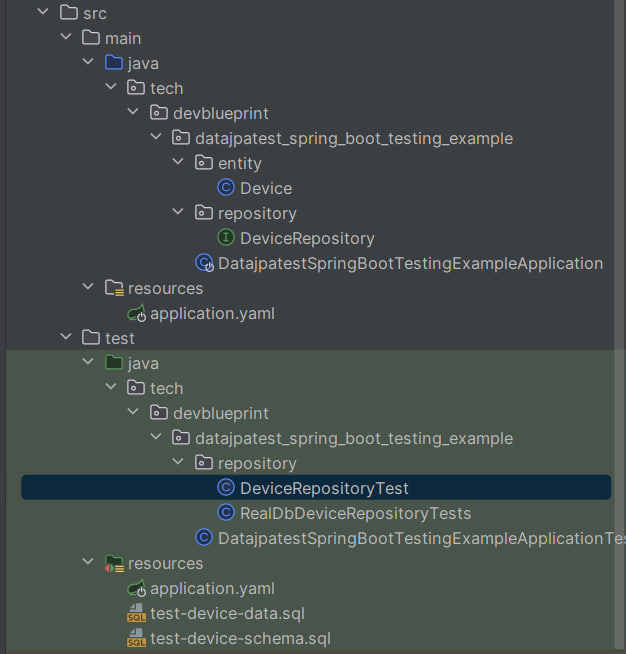
SQL scripts should be placed in src/test/resources so that Spring Boot can automatically load them during test execution.
Schema Definition
File: src/test/resources/test-device-schema.sql
CREATE TABLE devices
(
    id    INT AUTO_INCREMENT PRIMARY KEY,
    name  VARCHAR(255) NOT NULL,
    type  VARCHAR(100),
    price DOUBLE
);
Test Data Insertion
File: src/test/resources/test-device-data.sql
INSERT INTO devices (id, name, type, price)
VALUES (1, 'iPhone 13', 'Smartphone', 999.99),
       (2, 'Galaxy S22', 'Smartphone', 899.99),
       (3, 'Dell XPS 13', 'Laptop', 1199.99),
       (4, 'MacBook Pro', 'Laptop', 1999.99);
Conclusion
In this guide, we explored how to use @DataJpaTest with H2 in-memory database instead of a real PostgreSQL database.