Introduction
The @DataMongoTest annotation in Spring Boot is specifically designed for isolated testing of MongoDB repositories. It loads only MongoDB-related components, ensuring fast and efficient tests.
By default, @DataMongoTest:
- Automatically configures an embedded MongoDB instance (Flapdoodle).
- Rolls back changes after each test, keeping the database clean.
- Excludes unnecessary beans (@Service, @Controller), making tests lightweight.
However, for real-world testing, we sometimes need to test against a real MongoDB instance instead of an embedded database.
Project Setup
To get started, create a Spring Boot project with the following dependencies:
- Spring Boot Starter Data MongoDB – For working with MongoDB.
- Spring Boot Starter Test – Provides JUnit, AssertJ, and Mockito.
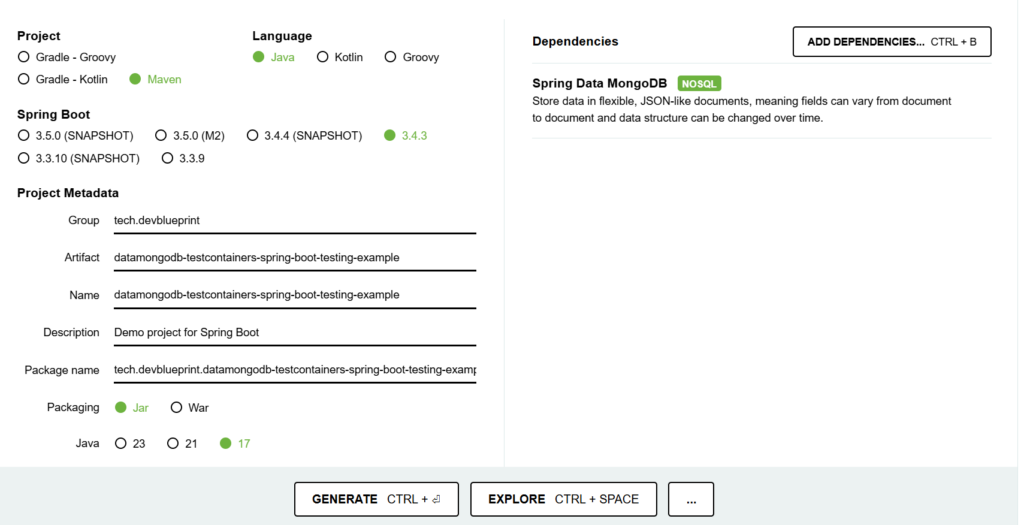
Spring Boot Testing Libraries
The spring-boot-starter-test dependency provides:
- JUnit – Core testing framework.
- Spring Boot Test – Provides utilities for integration testing.
- AssertJ – Fluent assertion library.
- Mockito – A mocking framework.
Implementation
1. pom.xml Configuration
<?xml version="1.0" encoding="UTF-8"?>
<project xmlns="http://maven.apache.org/POM/4.0.0" xmlns:xsi="http://www.w3.org/2001/XMLSchema-instance"
    xsi:schemaLocation="http://maven.apache.org/POM/4.0.0 https://maven.apache.org/xsd/maven-4.0.0.xsd">
    <modelVersion>4.0.0</modelVersion>
    <parent>
        <groupId>org.springframework.boot</groupId>
        <artifactId>spring-boot-starter-parent</artifactId>
        <version>3.4.3</version>
        <relativePath/> <!-- lookup parent from repository -->
    </parent>
    <groupId>tech.devblueprint</groupId>
    <artifactId>datamongodb-spring-boot-testing-example</artifactId>
    <version>0.0.1-SNAPSHOT</version>
    <name>datamongodb-spring-boot-testing-example</name>
    <description>Demo project for Spring Boot</description>
    <properties>
        <java.version>17</java.version>
    </properties>
    <dependencies>
        <dependency>
            <groupId>org.springframework.boot</groupId>
            <artifactId>spring-boot-starter-data-mongodb</artifactId>
        </dependency>

        <dependency>
            <groupId>org.springframework.boot</groupId>
            <artifactId>spring-boot-starter-test</artifactId>
            <scope>test</scope>
        </dependency>
    </dependencies>

    <build>
        <plugins>
            <plugin>
                <groupId>org.springframework.boot</groupId>
                <artifactId>spring-boot-maven-plugin</artifactId>
            </plugin>
        </plugins>
    </build>

</project>
Key Dependencies Explained:
spring-boot-starter-data-mongodb– Enables MongoDB support.spring-boot-starter-test– Includes necessary testing libraries.
2. Configuring a Real MongoDB Database for Testing
By default, @DataMongoTest starts an embedded MongoDB (Flapdoodle). To use a real MongoDB database, we need to:
- Disable embedded MongoDB in the test.
- Run a real MongoDB instance using Docker.
- Configure Spring Boot to connect to the real MongoDB.
Start MongoDB in a Docker Container
Run the following command to start a MongoDB instance locally:
docker run --name real-mongo -p 27017:27017 -d mongo
This starts a MongoDB container and exposes it on localhost:27017.
Test Database Configuration
Instead of using application.properties, we override the MongoDB connection dynamically in the test class.
File: src/test/resources/application.properties
de.flapdoodle.mongodb.embedded.version=5.0.5
spring.data.mongodb.database=test
spring.data.mongodb.port=0
Note: The spring.data.mongodb.port=0 setting ensures that Spring Boot doesn’t bind to an embedded MongoDB instance.
3. Document Definition
File: src/main/java/.../document/Device.java
package tech.devblueprint.datamongodb_spring_boot_testing_example.document;

import org.springframework.data.annotation.Id;
import org.springframework.data.mongodb.core.mapping.Document;

@Document(collection = "devices")
public class Device {

    @Id
    private String id;
    private String name;
    private String type;
    private String manufacturer;

    // Default constructor
    public Device() {
    }

    // Parameterized constructor
    public Device(String id, String name, String type, String manufacturer) {
        this.id = id;
        this.name = name;
        this.type = type;
        this.manufacturer = manufacturer;
    }

    // Getter and Setter for id
    public String getId() {
        return id;
    }
    public void setId(String id) {
        this.id = id;
    }

    // Getter and Setter for name
    public String getName() {
        return name;
    }
    public void setName(String name) {
        this.name = name;
    }

    // Getter and Setter for type
    public String getType() {
        return type;
    }
    public void setType(String type) {
        this.type = type;
    }

    // Getter and Setter for manufacturer
    public String getManufacturer() {
        return manufacturer;
    }
    public void setManufacturer(String manufacturer) {
        this.manufacturer = manufacturer;
    }
}
4. Repository Interface
File: src/main/java/.../repository/DeviceRepository.java
package tech.devblueprint.datamongodb_spring_boot_testing_example.repository;

import tech.devblueprint.datamongodb_spring_boot_testing_example.document.Device;
import org.springframework.data.mongodb.repository.MongoRepository;
import java.util.Optional;

public interface DeviceRepository extends MongoRepository<Device, String> {

    // Find a device by its name
    Optional<Device> findByName(String name);
}
Writing Tests with a Real MongoDB Database
Using a Real MongoDB Instance
With @DataMongoTest, we can disable embedded MongoDB and connect to a real instance.
package tech.devblueprint.datamongodb_spring_boot_testing_example.repository;

import de.flapdoodle.embed.mongo.spring.autoconfigure.EmbeddedMongoAutoConfiguration;
import org.junit.jupiter.api.BeforeEach;
import org.junit.jupiter.api.Test;
import org.springframework.beans.factory.annotation.Autowired;
import org.springframework.boot.test.autoconfigure.data.mongo.DataMongoTest;
import org.springframework.test.context.TestPropertySource;
import tech.devblueprint.datamongodb_spring_boot_testing_example.document.Device;

import static org.assertj.core.api.Assertions.assertThat;


@DataMongoTest(excludeAutoConfiguration = EmbeddedMongoAutoConfiguration.class)
@TestPropertySource(properties = "spring.data.mongodb.uri=mongodb://localhost:27017/test")
public class DeviceRepositoryRealMongoTest {


    @Autowired
    private DeviceRepository deviceRepository;

    @BeforeEach
    void setUp() {
        // Clean up database and insert test data
        deviceRepository.deleteAll();
        Device device = new Device("10", "RealDevice", "Sensor", "RealManufacturer");
        deviceRepository.save(device);
    }

    @Test
    void findByName_ReturnsDevice() {
        // Test retrieval of device by name from real MongoDB instance
        Device device = deviceRepository.findByName("RealDevice").orElse(null);
        assertThat(device).isNotNull();
        assertThat(device.getType()).isEqualTo("Sensor");
        assertThat(device.getManufacturer()).isEqualTo("RealManufacturer");
    }
}
Key Annotations Explained:
- @DataMongoTest(excludeAutoConfiguration = EmbeddedMongoAutoConfiguration.class) – Disables embedded MongoDB (Flapdoodle).
- @TestPropertySource(properties = “spring.data.mongodb.uri=mongodb://localhost:27017/test”) – Configures connection to the real MongoDB.
- @BeforeEach – Cleans up the database and inserts test data before each test.
- @Test – Runs the test case for MongoDB repository methods.
Understanding Transactions in @DataMongoTest
Unlike relational databases, MongoDB does not support transactions in the same way as SQL databases. Therefore, @DataMongoTest does not roll back changes automatically.
If needed, you should manually clean up the database before each test:
@BeforeEach
void setUp() {
    deviceRepository.deleteAll();
}
Conclusion
In this guide, we explored how to use @DataMongoTest with a real MongoDB database instead of the default embedded MongoDB (Flapdoodle).